

The iTero machine is an intraoral scanning system that is applied within the digital dentistry process. The device helps to record the surface of the teeth, the soft tissue within the area being observed, and the relationship of the bite, after which this resulting data is reconstructed into a 3D model that is displayed directly on a screen. The resulting data can be used in orthodontics, in restoration design, and to help the dentist discuss the treatment plan with the patient. In order to gain a clearer understanding of this system, let us explore the details together with Shark Dental Clinic right away in the article below.
What is the iTero intraoral scanner?
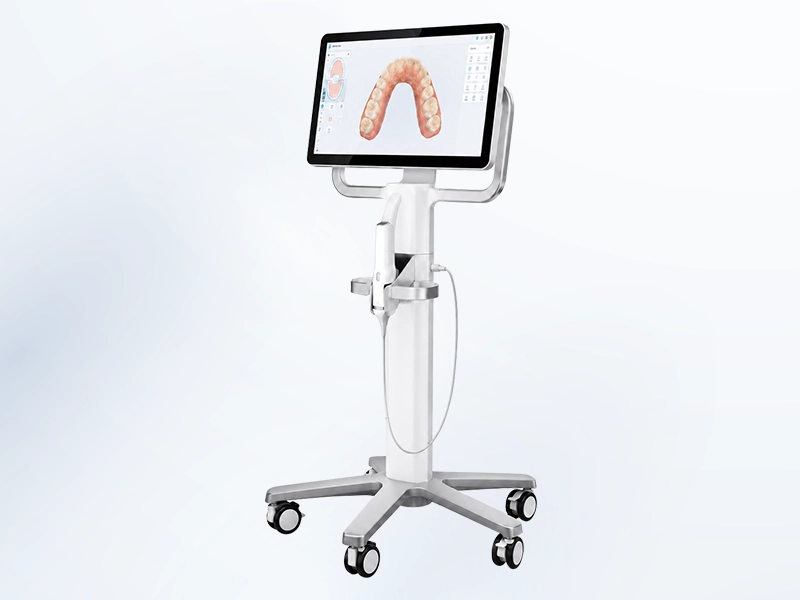
iTero is an intraoral scanning system that has been developed by Align Technology. The device uses a scanning tip in order to continuously record the surface of the teeth and the structures that can be observed within the oral cavity. The resulting data is then processed by software and reconstructed into a three-dimensional digital model.
In cases where this is considered suitable, the data produced by iTero can be used in place of a traditional dental impression. The dentist is able to check the model directly on the screen, to carry out additional scanning of any areas that are still missing, and to transfer the data to orthodontic software, to restoration design software, or to a laboratory. The specific features of the system will depend on the particular model of the machine being used, on the software configuration, and on the scope of application that has been provided by the manufacturer.
How does the iTero intraoral scanner work?
While carrying out the process, the dentist moves the scanning tip in turn across the surfaces of the teeth. The system simultaneously records the data and displays a 3D model on the screen in real time. The process typically consists of the following steps:
- Step 1 – Scanning the upper dental arch: The dentist moves the scanning tip in turn across the surfaces of the upper arch, in order to record the necessary data.
- Step 2 – Scanning the lower dental arch: Scanning continues across the surfaces of the lower arch, adding this additional data to the digital model.
- Step 3 – Recording the bite: The patient bites the two arches together, following the instructions given, so that the system is able to record the bite data.
- Step 4 – Checking the data: The dentist checks the model displayed on the screen, in order to identify any areas of data that are still missing or unclear.
- Step 5 – Additional scanning: Any areas where the data is not yet complete are scanned again whenever this is needed, in order to complete the model.
- Step 6 – Saving the data: Once the data has been completed, it is saved and transferred to the relevant software and department.
The iTero machine does not determine a diagnosis or decide on a treatment plan on its own. It is still the dentist who directly carries out the examination, who assesses the data that has been collected, and who provides the relevant professional recommendation for each case.
What does the iTero intraoral scanner help to support?
The iTero machine helps to record and process data about the patient’s teeth and gums in digital form, making it more convenient for the dentist to observe, assess, and use the data in cases where this is considered suitable. Some of its supporting roles include the following:
- Recording the shape of the teeth: Creates a 3D model that shows the shape, the size, and the relative position of each tooth within the scanned area.
- Recording the relationship of the bite: Helps to assess the relationship between the two dental arches based on the digital data.
- Providing a visual view: The 3D model can be enlarged, reduced, and rotated from a number of different angles, which helps the dentist to check the data and to discuss it with the patient.
- Supporting orthodontics: The scanned data can be used to plan orthodontic treatment and to design a suitable appliance or set of clear aligners.
- Supporting restoration: The scanned data can be transferred into the CAD/CAM process in order to design certain types of restoration.
- Storage and comparison: The digital record is convenient for storage and can be used to compare how the patient’s teeth change over time whenever this is needed.
The specific simulation, monitoring, or specialized assessment features available will depend on the particular model of the machine and the software being used.
Which services make use of the iTero intraoral scanner?
The iTero intraoral scanner can be applied across many dental services that require the recording of tooth and dental arch data in digital form, including:
- Orthodontic treatment using clear aligners.
- Orthodontic treatment using braces.
- Designing a retainer for use after orthodontic treatment.
- Inlays, onlays, and bridges.
- Restorations placed on top of implants.
- Designing a night guard.
- Monitoring the shape of the teeth and the dental arch over time.
It is not the case that every single service or situation necessarily requires the use of the iTero machine. The dentist will choose whichever method of recording data is appropriate, based on the treatment goal involved.
The process of scanning teeth using the iTero machine at Shark Dental Clinic
The process of scanning teeth using the iTero machine at Shark Dental Clinic is carried out step by step, in order to fully record the necessary dental data within the required scope:
- Step 1 – Examination and assessment: The dentist checks the condition of the teeth, gums, and bite, and at the same time determines the specific purpose of the scan.
- Step 2 – Preparation of the oral cavity: The surface of the teeth is cleaned, and saliva is controlled, before the scanning process begins.
- Step 3 – Scanning the dental arch: The dentist moves the scanning tip in turn around the surfaces of the teeth, following a sequence that is appropriate, in order to record the data.
- Step 4 – Recording the bite: The patient bites the two arches together, following the instructions given, in order to record the bite data.
- Step 5 – Checking the data: The dentist checks the 3D model, identifies any areas that are still missing, and carries out additional scanning if this is needed.
- Step 6 – Saving and transferring the data: Once the data has been completed, it is stored or transferred to the relevant software, laboratory, or department.
Notable features of the iTero intraoral scanner
The iTero scanner offers a digital method of recording dental data, with a number of notable features, including the following:
- Displaying a 3D model of the teeth: The scanned data is reconstructed into a 3D model of the teeth, which is displayed directly on the screen.
- Checking and carrying out additional scanning: The dentist is able to check the data shown on the model and carry out additional scanning of any areas that are still missing, whenever this is needed.
- No impression material required in suitable cases: Helps to record data without the need to use traditional impression-taking materials.
- Storing and transferring digital data: The data can be stored and transferred to the relevant departments by digital means.
- Supporting digital orthodontics and restoration work: The scanned data can be connected to the digital orthodontic and restoration process.
- Helping the patient to observe the shape of their teeth: The 3D model allows the patient to directly observe the shape of their own teeth and to better understand what the dentist is explaining.
Limitations of the iTero intraoral scanner
Alongside its ability to record dental data digitally, the iTero machine still has certain limitations during the course of its use.
- Saliva or bleeding: This can affect the recording of data within the area that needs to be scanned.
- A restoration finish line that lies deep beneath the gum line: This can make it difficult to fully record the necessary area.
- A patient who has difficulty opening their mouth or staying still: This can affect the scanning process and the quality of the resulting data.
- A long span of missing teeth: There are fewer anatomical landmarks available for the software to use when stitching the data together, which can make the process of creating the model more difficult.
- A wide area requiring restoration, or a complex clinical situation: This can create certain limitations in recording data using the intraoral scanner.
- The scanning technique and the experience of the operator: These factors can affect the recording process and the completeness of the resulting data.
The iTero machine does not fully record the internal structure of the teeth or the jawbone, and it does not replace an X-ray or a Cone Beam CT scan. In certain cases, the dentist may choose to take a traditional impression, or to combine several methods, in order to record the data that is appropriate to the situation.
Which technologies is the iTero intraoral scanner commonly combined with?
The iTero scanner can be combined with a number of different technologies and systems in order to support the process of orthodontics, restoration, and the recording of dental data.
- Orthodontic software and clear aligner design software.
- CAD/CAM systems.
- Restoration design software.
- Cone Beam CT, in treatment plans that require an assessment of the bone and the anatomical structures involved.
- Milling machines, 3D printers, or restoration fabrication systems.
Frequently asked questions
Thanks to its ability to record dental data in digital form, the iTero machine is applied in many orthodontic and restoration cases. That said, before going ahead, patients may still have a number of questions about this particular type of device. Set out below are some of the most frequently asked questions, along with detailed answers.
Is scanning teeth with the iTero machine painful?
The scanning tip is placed within the oral cavity in order to record the surface of the teeth, and it does not emit any X-rays. During the process, the patient may feel a slight sensation of the tip being present when scanning the teeth located further back in the mouth, but in general, this process does not cause any pain.
Does the iTero machine replace the need for an X-ray?
The answer is no. The iTero machine primarily records the surface of the teeth and the soft tissue within the area being observed. An X-ray, on the other hand, is used to help assess internal structures such as the tooth roots and the jawbone.
Can the iTero machine show the exact result after orthodontic treatment?
Certain compatible software programs are able to generate a simulated image in order to help discuss the treatment plan. However, this image does not represent a guarantee of the actual outcome. The result of orthodontic treatment still depends on the condition of the teeth, the treatment plan, and the individual patient’s degree of response to treatment.
Can every case be scanned using the iTero machine?
Not every single case is suitable for scanning with the iTero machine. The dentist will consider this carefully, based on the particular area that needs to be recorded, the condition of the patient’s teeth and gums, and the requirements of each individual type of treatment.
Overall, the iTero intraoral scanner helps to record the surface of the teeth, the soft tissue within the area being observed, and the relationship of the bite, all in the form of 3D data. This data can be used to support the process of orthodontics, restoration design, and discussion of the treatment plan. At Shark Dental Clinic, the iTero machine is applied in cases that are considered suitable, based on the dentist’s own assessment. Patients who would like to learn more can contact the hotline at (+84) 941 623 322 to arrange an examination and receive suitable advice.